How to Print and Bind Your Own Planner at Home
A printable planner gives you exactly the pages you want, and you can reprint any page whenever you like. Printing it is the easy part; binding it is where most people get stuck. Here's the whole process, with five ways to bind, from a binder you already own to a print-shop coil.
This guide includes Amazon search links. As an Amazon Associate I earn from qualifying purchases. We haven't tested specific brands; we explain what to look for, so compare options and reviews yourself. Disclosures
Print and bind in five steps
- Choose the paper. 24 lb paper for single-sided pages, 28–32 lb for double-sided pages, and card stock for the covers.
- Print a test sheet. Print one page at 100% (Actual size), then print its back, and check that the margins and the back line up.
- Print in sections. Print one month or one section at a time, so a paper jam or a mistake only costs a few sheets.
- Punch or bind. Punch for a binder or discs, or take the stack to a print counter for coil binding.
- Add covers and tabs. Add a card stock cover, a clear front sheet and a tab for each month.
Not sure which paper? See the guide to the best paper for printing planners.
Double-sided printing without the headaches
Printing on both sides halves the paper and makes a slimmer planner. If your printer has automatic duplexing, choose “Print on both sides” and the right flip edge: the long edge for portrait pages bound on the left, and also the long edge for landscape calendar pages that flip up like a wall calendar. Landscape pages bound on the left side use the short edge.
No duplexing? Print the odd pages, put the printed stack back into the tray and print the even pages. Every printer feeds paper differently, so draw an arrow on the top of one test sheet the first time and note which way it comes out. Let ink-heavy pages dry for a minute before printing the back.
How many sheets you need
| Printable | Pages | Sheets, one-sided | Sheets, double-sided | Sheets as a booklet |
|---|---|---|---|---|
| 2027 Printable Planner | 88 | 88 | 44 | 22 |
| Printable Planner Pack | 27 | 27 | 14 | 7 |
| Christmas Planner | 19 | 19 | 10 | 5 |
| Printable Budget Binder | 14 | 14 | 7 | 4 |
A booklet holds four pages per folded sheet, so its page count rounds up to a multiple of four.
Five ways to bind a printed planner
1. A three-ring binder
The easiest and most flexible option. Punch the pages with a 3-hole punch (US Letter binders use holes 4¼ inches apart) and use a 1-inch binder with a clear view cover, so you can slide a printed cover into the front. Pages are easy to add and move. The rings can get in the way when you write near the left edge, especially if you're left-handed. Outside North America, A4 binders usually have two or four rings, so check yours before you punch.
2. Discbound
Pages with mushroom-shaped holes slip on and off plastic or metal discs. A discbound planner lies flat, and you can rearrange pages as often as you like, which suits undated printables. You'll need a discbound punch and discs; the punch is the main cost.
3. Coil or comb binding at a print shop
Ask for coil binding with a clear plastic front cover and a card back. It lies flat, looks finished and survives a year in a bag. The catch: you can't add pages later, so bind one quarter or one half of the year at a time.
4. A stapled booklet
Great for a slim monthly planner or a notes booklet. In your PDF app's print dialog, choose booklet printing (in Adobe Acrobat Reader it's under Page Sizing & Handling), fold the stack in half and staple the spine with a long-reach stapler. Each page shrinks to about 65% on Letter paper (71% on A4), so keep booklets for pages with big boxes.
5. A clipboard and a folder
The zero-setup option: keep this week or this month on a clipboard on your desk and the rest in a folder. It works well for the free weekly planner and daily planner pages.
Which binding is right for you?
| Binding | Lies flat | Add or move pages | Best for |
|---|---|---|---|
| Three-ring binder | Yes | Yes | Budget and home binders, undated pages |
| Discbound | Yes | Yes | Planners you rearrange often |
| Coil or comb | Yes | No | A finished, dated planner |
| Stapled booklet | Mostly | No | Slim monthly booklets and notes |
| Clipboard | Yes | Yes | One week or month at a time |
Covers, tabs and finishing touches
- Print the cover on 65–80 lb card stock and add a clear plastic sheet or laminate it so it doesn't scuff.
- Add sticky tabs for each month, or for each section of a budget binder.
- Put a pocket folder or a zip pouch at the back for receipts, tickets and cards.
- Keep a pen with the planner: a pen loop or an elastic band helps.
The dated 2027 Printable Planner is grouped by month, so you can print as you go, and the free 2027 calendar is a good first print to test your setup.
Printing and binding FAQ
How do I print a planner double-sided?
Choose “Print on both sides” and the flip edge: long edge for portrait pages bound on the left. Without automatic duplexing, print the odd pages, put the stack back in the tray and print the even pages. Mark the top of the first sheet so you know which way to load it.
What is the cheapest way to bind a planner?
A three-ring binder or a clipboard you already own. Both cost nothing extra, and a binder lets you add pages all year.
Can a print shop print and bind my planner?
Yes. Most office-supply print counters can print a PDF double-sided and add coil or comb binding. Ask for one proof page first to check the size and margins.
Why does booklet printing make the pages smaller?
A booklet puts two pages side by side on one sheet, so each Letter page shrinks to about 65% and each A4 page to about 71%. It suits notes and lists, but daily boxes get tight.
Should I print the whole year at once?
Print a month or a quarter at a time. It spreads the cost of paper and ink, and you can adjust the next batch if something isn't working.
More guides
How to plan your 2027 · 2027 US holidays · 2027 week numbers · Working days in 2027 · UK bank holidays 2027 · Canada holidays 2027 · Christmas countdown · Thanksgiving countdown · New Year countdown · Debt snowball vs avalanche · The 50/30/20 rule explained · How to make a budget · Sinking funds · How to use a digital planner · Best paper for printing planners · How to frame printable wall art · Large-print puzzles for seniors · Homeschool printing supplies checklist
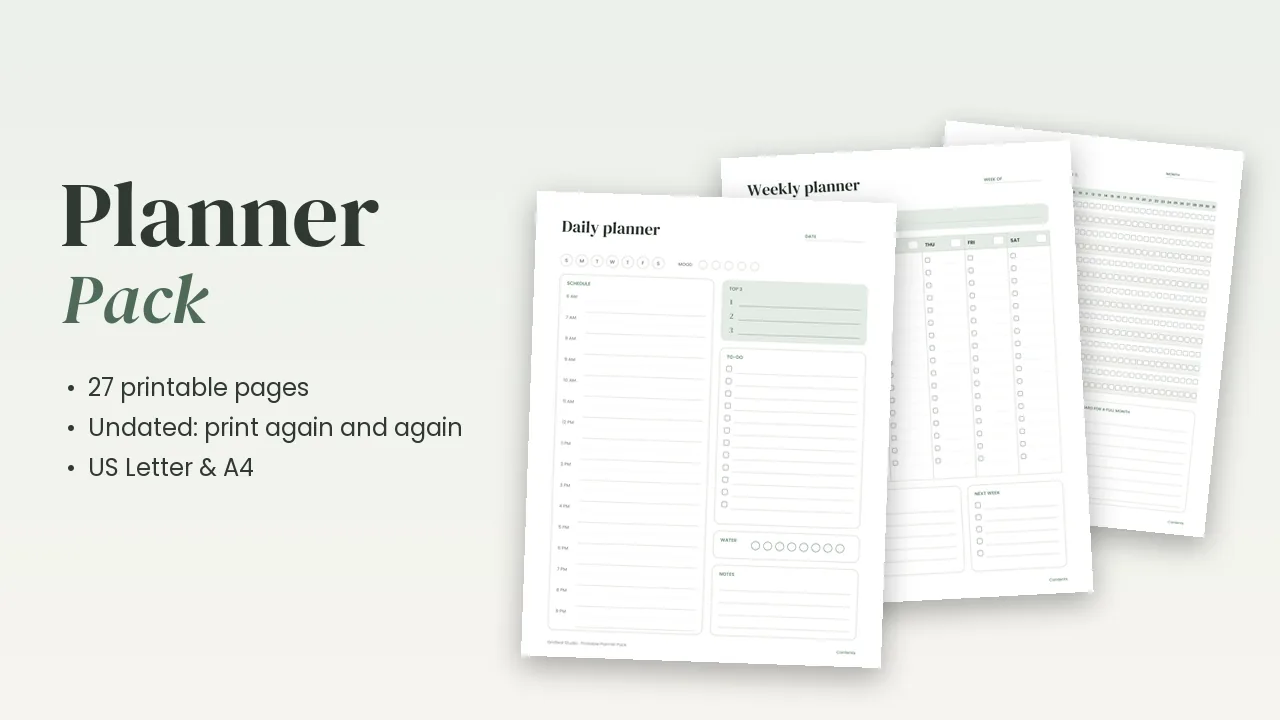
Printable Planner Pack
All 27 undated pages in one PDF: daily, weekly and monthly planners, habit, mood, water and sleep trackers, meal planning, fitness, reading, travel and more. US Letter & A4.